A connected workplace display is the visible end of a longer information chain. Content may be created in one system, delivered over a network, processed by a player and shown on a screen in another location. A problem anywhere along that chain can affect what staff and visitors see.
Planning cloud infrastructure for workplace displays means understanding those dependencies and deciding how the service should behave when something changes or fails. This guide provides a practical framework for organisations evaluating cloud-managed signage, directories and related digital workplace tools. It focuses on questions to resolve with your IT team and supplier rather than assuming a specific hosting architecture.
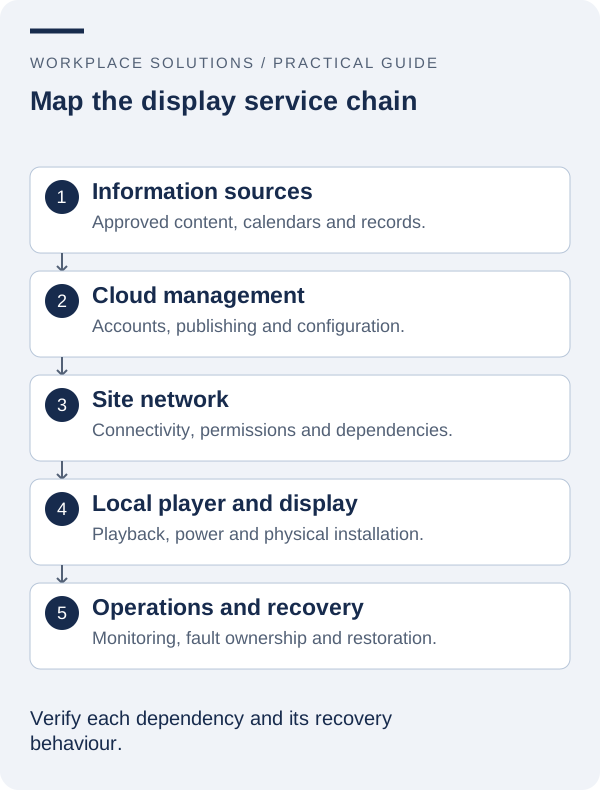
1. Map the service from source to screen
Draw the path followed by each important type of information. A prepared announcement may be uploaded to a content platform, while room information may come from a separate calendar source. Both may eventually reach the same display, but their dependencies and failure behaviour can differ.
Identify the content source, management service, network connection, playback device and display. Note who operates each component and where responsibility changes between the organisation, building management and external providers. The purpose is not to create a complicated architecture diagram; it is to make ownership and dependencies visible.
Ask which functions require a live connection and which may operate using previously downloaded material. A solution that continues playback during a brief outage still needs a way to recover management access and update content later. Confirm these behaviours for the actual hardware and software configuration.
Include supporting services such as account administration, name resolution and any approved data feeds where relevant. A screen that depends on another system inherits some of that system’s operating requirements. Documenting the chain helps avoid treating every interruption as an unexplained “screen problem”.
2. Agree network requirements before installation
Involve the network owner early. Ask the supplier for the connection requirements, including any destinations, protocols or access arrangements the solution needs. Have the organisation’s IT team review them through its normal process instead of discovering restrictions while an installer is waiting on site.
Discuss the intended connection method and the conditions at each location. A network arrangement that works in a small meeting room may not be suitable for a public lobby or a remote building. Consider the reliability, support ownership and physical installation implications of the proposed approach.
Clarify how devices will be identified and managed on the network. If segmentation or additional controls are required, agree how they will be implemented and tested. Avoid publishing sensitive network details in a public installation guide or a support label visible to visitors.
Use the pilot to verify actual communication, rather than relying only on a general internet connectivity test. Being able to open a website does not establish that every required service is available to a player or that an integration will function under the organisation’s approved security settings.
3. Control administrator access and account ownership
Separate the people who need to publish routine content from those who administer the service. Ask what roles and permissions the proposed platform supports, then map them to actual responsibilities. If fine-grained roles are unavailable, document the limitation and decide how the organisation will manage the associated risk.
Use organisation-controlled accounts wherever possible so that access survives staff changes. Establish a process for approving new users, reviewing access and removing accounts when responsibilities change. Shared credentials can make ownership and investigation more difficult, particularly when several sites use the same service.
Ask whether multi-factor authentication and suitable access records are available for the required administration functions. Treat them as requirements to evaluate, not features to assume. If a provider manages part of the environment, confirm how support access is authorised and how it is removed when no longer needed.
Keep account recovery and essential configuration records in an approved internal location. The organisation should know who can recover access without placing credentials in a public document, a label on the player or an informal message thread that is difficult to maintain.
4. Understand what data the service handles
List the information the solution stores or processes. This may include uploaded media, user accounts, device identifiers, scheduling data and records from connected systems. Distinguish content intended for public display from information needed only to administer the service.
Ask the provider where relevant data is processed, how it is protected and what arrangements apply when the service ends. Do not infer Australian data residency, a particular certification or a contractual retention period from a product’s name or a supplier’s local contact details. Confirm requirements and commitments explicitly.
If personal information is involved, have the relevant organisational owners review the proposed use and disclosure. The OAIC’s Australian Privacy Principles information can support that review, alongside the organisation’s own policies and advice about applicable obligations.
Minimise unnecessary data movement. A directory may only need approved public names and locations, not every field in an internal source. A calendar display may need a restricted set of event details. Defining the smallest useful information set makes the service easier to explain, test and maintain.
5. Plan continuity and recovery around the actual use
Decide what an interruption means for each display. A general promotional screen and a frequently changing event board may tolerate different periods of unavailable or older content. Ask the business owner to explain the consequence, then use that understanding to guide recovery and fallback requirements.
Confirm which content or configuration can be backed up or exported, who performs that work and how restoration is tested. A backup that has never been used does not establish that the organisation can recover the service within a useful period. The recovery process should include the people expected to carry it out.
Prepare appropriate fallback content and an alternative information channel. A generic welcome message may be acceptable for one display, while another needs staff to provide current directions or schedules. Keep the fallback consistent with the service’s purpose and avoid implying that older information is current.
Document dependencies that could extend recovery, such as obtaining a replacement player, restoring an account or arranging site access. These practical steps often matter as much as the cloud service itself when a display needs to be returned to operation.
6. Monitor signals that show the service is useful
A device reporting that it is online provides only part of the picture. The screen could still show an incorrect input, outdated content or an unsuitable layout. Combine available technical signals with checks that confirm the intended information is actually visible.
Ask which monitoring capabilities the solution provides and which checks remain with local staff. If alerts are available, define who receives them, what action is expected and how repeated alerts are reviewed. An alert without an owner can become background noise rather than an effective support mechanism.
Keep device names consistent with physical locations so an incident can be understood without guesswork. A support record should identify the affected service and its business purpose, not just a serial number. That context helps determine priority and whether a temporary alternative is needed.
Measure recurring interruptions and the actions required to resolve them. The goal is to identify patterns that justify a change to configuration, equipment, training or supplier arrangements. Avoid collecting additional personal data simply because a monitoring tool offers the option.
7. Manage updates, integrations and supplier changes
Cloud-managed services still need change management. Software updates, account-policy changes, network adjustments and revisions to an external data source can affect displays. Identify which changes the provider controls and which require action or review by the organisation.
Where practical, test significant changes on a representative device or limited group before a wider rollout. Keep a record of the previous working arrangement and agree on a recovery plan. The appropriate process depends on the environment, but it should be understood before a critical change is required.
For integrations, document the source owner, the fields used and the support path. A renamed field or changed permission can interrupt an otherwise stable display. Set expectations for how teams will communicate changes that affect the connection.
Plan for the possibility of changing suppliers or retiring the service. Clarify how the organisation will obtain its content and relevant records, remove accounts and decommission equipment. A clear exit process is part of responsible service design, even when no immediate change is expected.
8. Build a brief that business and IT teams can share
A practical infrastructure brief connects the business purpose to technical responsibilities. Include the display locations, intended content, source systems, operating hours and consequences of an interruption. Add the required administration roles, information-handling questions and expected support arrangements.
Separate confirmed facts from decisions still to be made. If a network method, data source or recovery approach is uncertain, record the owner of the question and the evidence needed to resolve it. This helps prevent assumptions from quietly becoming part of the final installation.
Use the pilot to test the brief as a complete service: publish information, observe it at the display, introduce an approved interruption and recover through the agreed process. Record what happened and update the operating documentation before scaling to more locations.
Workplace Solutions’ cloud infrastructure, consulting and support services provide a starting point for that conversation. Bring the people responsible for workplace communication and IT together so the proposal can address the whole service, from its source information to the screen people rely on.